
Area Calculator
The following are calculators to evaluate the area of seven common shapes. The area of more complex shapes can usually be obtained by breaking them down into their aggregating simple shapes, and totaling their areas. This calculator is especially useful for estimating land area.

Rectangle
 |
Triangle

Use the Triangle Calculator to determine |
Trapezoid
 |
Circle
 |
Sector
 |
Ellipse
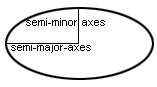 |
Parallelogram
Calculate Any Area in Seconds: From Simple Rectangles to Complex PolygonsThis area calculator instantly computes the surface area for standard geometric shapes like rectangles, circles, and triangles. Its primary value is eliminating manual formula lookup and arithmetic errors for common tasks, from ordering flooring material to estimating garden space. The critical non-obvious insight is that the tool’s accuracy is entirely dependent on your initial measurements; a 5% error in length creates a 10-25% error in final area for most shapes, a compounding risk the calculator itself cannot mitigate. Beyond Basic Shapes: The Hidden Complexity of Area CalculationMost people assume an area calculator is just a digital version of “length times width.” That’s true for a perfect rectangle. The real utility, and the real complexity, emerges when you need the area of a composite space—a living room with a bay window, an L-shaped garage, or a garden plot with a curved border. The tool works by breaking down your problem into a known geometric primitive. You select the shape that best matches your space. For a room with an alcove, you would calculate the main rectangle and the alcove separately, then add the results. This method of decomposition is fundamental. The hidden variable here is how you decompose the space. Choosing the wrong primary shape or misidentifying a component leads to a correct calculation of the wrong answer. Consider a simple example: a 20ft by 15ft room with a 3ft by 3ft square bay window. * Method A (Correct): Calculate the main rectangle (20 x 15 = 300 sq ft). Calculate the bay window (3 x 3 = 9 sq ft). Total area = 309 sq ft. * Method B (Incorrect): Approximate the entire room as a 23ft by 15ft rectangle. This yields 345 sq ft—a 12% overestimate because you’ve double-counted the wall space between the room and the bay. The calculator faithfully executes the formula you choose. The judgment lies in modeling the real-world space accurately. For irregular shapes like ellipses or polygons, the tool uses standard formulas, but you must supply the correct inputs (e.g., major/minor axis for an ellipse, all side lengths for an irregular polygon).
This decomposition approach has a direct trade-off: speed versus precision. Using a single, larger shape is faster but less accurate. Breaking a complex area into ten smaller, precise shapes takes more time but yields a result you can trust for ordering expensive materials like hardwood or custom countertops. Measurement Errors and Practical Trade-offsThe most significant limitation of any area calculator isn’t the software—it’s the tape measure. The relationship between a linear measurement error and the resulting area error is nonlinear and shape-dependent. This is the second critical insight: the calculator gives a false sense of precision. The Square Law Effect: For a square or circle, a small error in one key dimension is squared in the area output. * Example (Hypothetical): You measure a room’s length as 12.0 feet. The true length is 12.3 feet (a 2.5% error). The width is exactly 10.0 feet. * Calculated Area: 12.0 × 10.0 = 120.0 sq ft. * True Area: 12.3 × 10.0 = 123.0 sq ft. * Your error is 3.0 sq ft, or 2.4%. The linear error propagated almost 1:1 to area here. * Example with a Circle (Hypothetical): You measure a garden’s radius as 5.0 feet. The true radius is 5.15 feet (a 3% error). * Calculated Area: π × (5.0)² ≈ 78.54 sq ft. * True Area: π × (5.15)² ≈ 83.32 sq ft. * Your error is 4.78 sq ft, or 6.1%. The 3% radius error doubled in impact on the area because the radius is squared in the formula. This asymmetry is crucial. For circles and squares, invest extra time in getting the primary dimension (radius, side length) perfect. For rectangles, errors in length and width can sometimes offset each other if one is slightly over and the other slightly under, but you cannot rely on this. Practical Usage Nuances: * Units are Silent Killers: The calculator will compute “5 × 10” as 50. It won’t know if that’s 5 feet by 10 feet (50 sq ft) or 5 inches by 10 inches (0.347 sq ft). Always ensure your input units match your desired output units. Convert everything to feet or meters before input. * “Area” vs. “Material Needed”: This is a pure geometric area calculator. For flooring, siding, or paint, you must add a waste factor (typically 5-15% for straight layouts, 15-25% for diagonal or complex patterns) and account for material sold in fixed increments (e.g., by the square yard or in full boxes). The calculator gives you the net area; your purchasing decision requires gross area. * Contextual Accuracy: Calculating the area of a plot of land for a fence requires less precision (to the nearest square foot) than calculating countertop area for a granite slab (to the nearest square inch). Know your project’s tolerance. After using this tool, your next logical step is often a Perimeter Calculator (for fencing or trim) or a Volume Calculator (for mulch, concrete, or air conditioning capacity—where area × height is needed). The area result is the foundational number for these subsequent decisions. The One Thing You Must Do After Calculating AreaAfter you get your number, do not immediately place an order. Physically re-measure the two most critical dimensions you input. If you calculated a room as 15’4” by 12’1”, go back and verify that 15’4” measurement. Catching a single misread tape measure here is the single most effective action to prevent costly material shortages or over-purchases. |